jinryx.com / CronTally
 CronTallyProfessional Suite
Local-first time tracking and invoicing
CronTally logs billable sessions inside your editor and keeps data on your machine. Pro unlocks invoicing, exports, and unlimited clients with a one-time license.
$29 one-time, no subscription Delivered instantly by email 14-day refund policy
Also on VS Code Marketplace, publisher jinryx
Interactive Pro Sandbox
Start the timer, log sessions, and preview a Pro invoice. No install required.
In your editor
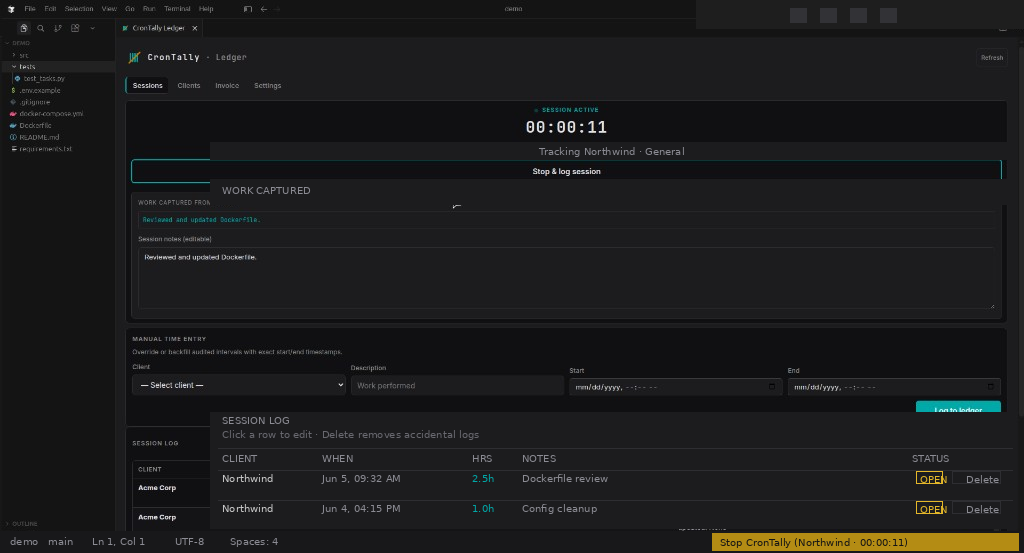
What it does
Status-bar timer
Track time with client and project tags without leaving your editor.
Session ledger
Review logged hours, activity summaries, and client history in one place.
Pro invoicing
Build invoices from sessions, export PDF/HTML, and customize your brand.
FAQ
Is CronTally Pro a subscription?
No. Pro is a $29 one-time license. Pay once, activate in CronTally Settings, and keep Pro features on your machine.
Where is my time tracking data stored?
On your computer. CronTally uses a local SQLite database in your editor. No CronTally cloud account and no session data uploaded to jinryx.
How do I activate after purchase?
After checkout, Lemon Squeezy emails your license key. Open CronTally in VS Code or Cursor, go to Ledger, then Settings, paste the key, and click Activate.
What's included in the free version?
The free extension on the VS Code Marketplace includes the status-bar timer and session ledger (up to two clients). Pro adds unlimited clients and invoicing.
Who processes payment?
Lemon Squeezy is the Merchant of Record for CronTally Pro. They handle checkout, tax, and refunds. Your statement may show Lemon Squeezy.
Get Pro
CronTally Pro
$29 one-time
Secure checkout via Lemon Squeezy. License key by email.
- Unlimited clients
- Invoicing and PDF/HTML export
- Brand customization
- Invoice status tracking
Payments for CronTally Pro are processed by Lemon Squeezy, which acts as the Merchant of Record for tax, billing, and refunds on digital purchases. Your card statement may show Lemon Squeezy. jinryx does not store payment card data. License keys are delivered by Lemon Squeezy after checkout.